M-Pesa Integration for Kenyan Businesses
Kenyan consumers prefer M-Pesa over cash. Your business needs to accept mobile money to stay competitive. Turning away customers leads to lost sales.
Not all integrations offer the same quality. Native integration is fast and reliable. This guide shows the right way to accept M-Pesa.
What is M-Pesa POS Integration?
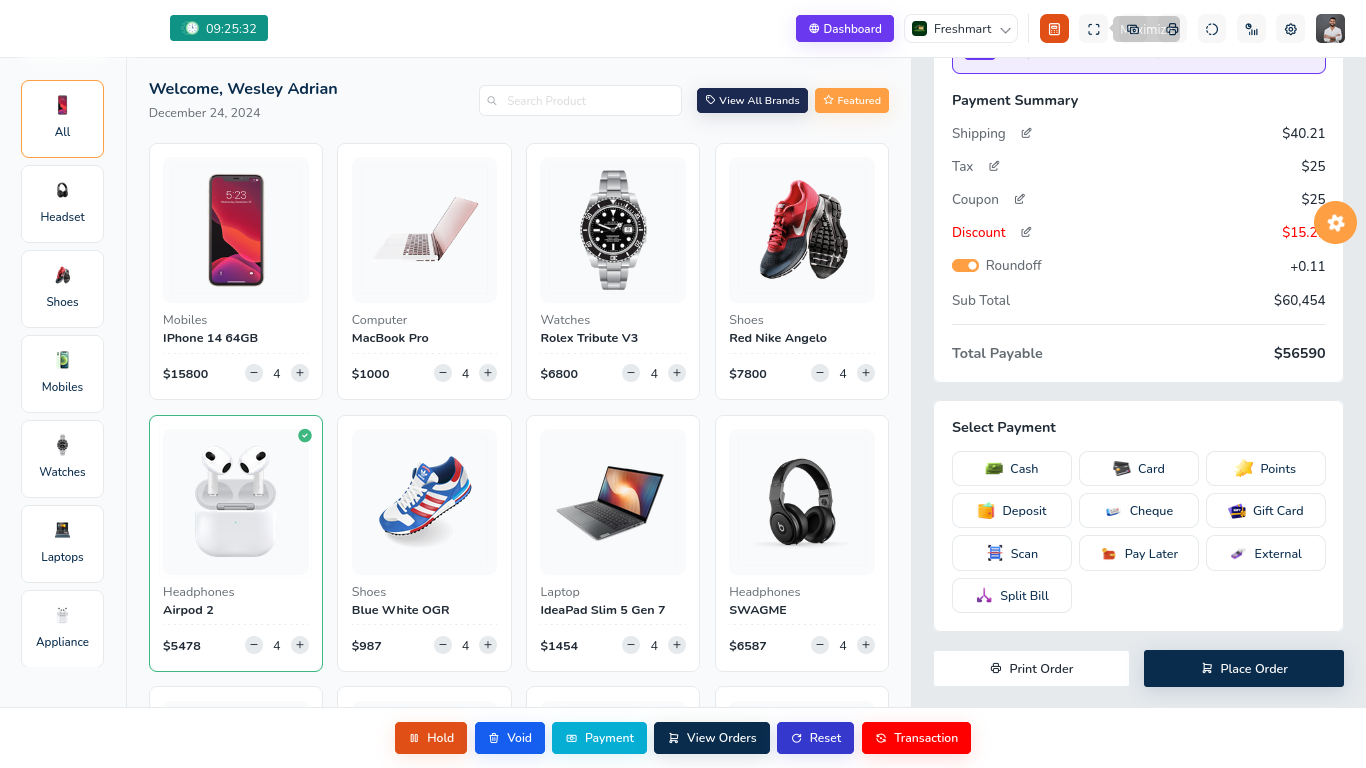
M-Pesa POS integration allows your system to accept payments directly. No separate devices are necessary.
The Process
- A customer selects items.
- The cashier totals the sale.
- The customer chooses M-Pesa.
- The customer enters their phone number.
- The system sends a push notification.
- The customer enters their PIN.
- Verification happens instantly.
- The receipt prints automatically.
Total time is 15 to 30 seconds.
Technical Details
POS systems connect to Safaricom APIs. Native integration is built into the software. Instant confirmation and automatic reconciliation are standard. Third party plugins often add fees and delays.
Benefits of M-Pesa Integration
- Faster Transactions: Integrated M-Pesa takes 30 seconds. Manual processes take three minutes. You serve more customers during peak hours.
- Zero Cash Handling: Cash involves risks like theft and counterfeit notes. M-Pesa is traceable and secure. There is no need for change. Settlement happens instantly.
- Improved Cash Flow: Access funds on the same day. Settlement goes to your business account fast. Reduce banking fees.
- Better Experience: Customers prefer paying with M-Pesa. Checkout speed increases. Digital receipts are instant.
- Complete Records: Every transaction is recorded and time stamped. Reports include all sales. This helps with accounting and tax compliance.
Integration Costs
Setup Costs
M-Pesa business accounts have no application fee. Approval takes five days. POS systems with integration start at 45,000 KES.
Ongoing Costs
Safaricom charges small transaction fees. Cloud services are optional. Software updates are free for 12 months.
Manual Versus Integrated Costs
Integrated systems save 22,500 KES monthly by reducing errors and time.
Integration Types
- STK Push: This method is the fastest. The system sends a request to the phone. The customer confirms with a PIN. Experience is seamless.
- Paybill and Till Numbers: Customers send money manually. The system detects the payment. This method works with all phones but is slower.
- QR Codes: The system generates a code. Customers scan with the app. Experience is modern.
Setup Steps
- Phase 1: Get M-Pesa for Business. Choose between Paybill and Till numbers. Provide your business documents to Safaricom. Wait for approval.
- Phase 2: POS System Setup. Choose a system with native integration. Install the hardware. The provider connects your account to the API. Test the system with small amounts.
- Phase 3: Training and Go Live. Train staff to process payments and handle errors. Start with a few transactions. Promote M-Pesa acceptance in your shop.
Choosing a Provider
Ensure the system offers native integration and instant confirmation. Automatic reconciliation matches payments to sales. Offline capability allows sales during outages. Avoid providers with hidden fees.
Challenges and Solutions
Failed transactions happen due to balance or network issues. The POS should show clear messages. Manual confirmation is a fallback. Automatic matching algorithms fix reconciliation errors.
Best Practices
- Display M-Pesa signs at your entrance and checkout.
- Train staff on common scenarios.
- Monitor transaction success rates daily.
- Optimize for speed.
- Confirm payments and print receipts immediately.
Case Studies
- A Nairobi supermarket served customers 75 percent faster. Errors dropped by 93 percent.
- A Westlands restaurant increased revenue by 35 percent. Theft incidents stopped.
Future of M-Pesa
Expect integration with loyalty programs and coupons. Cross border transactions will grow. Installment payments and AI insights will enhance retail.
Common Questions
- No separate device is necessary.
- STK push eliminates amount errors.
- Refunds are possible through the POS.
- Offline mode handles internet outages.
- Reconciliation is automatic.
Get Started
Visit our Nairobi showroom in Westlands or the CBD. See the systems in action. Request a quote for your business. Join 500 businesses using NexaPOS.
Mobile money is essential in Kenya. Upgrade to an integrated POS to improve speed and security.
Contact NexaUI Tech at +254 727 358 261.